
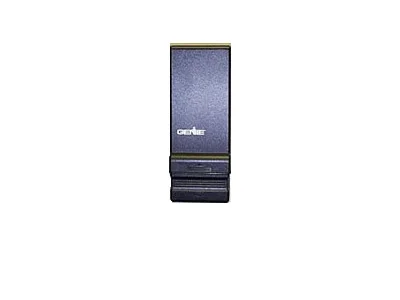
Genie Wireless (slide up cover)
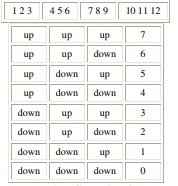
Resulting Security Code
PLEASE NOTE: DURING 2000, THE FACTORY MODIFIED THIS KEYPAD. IF THE KEYPAD DOES NOT WORK AFTER FOLLOWING THESE DIRECTIONS – TRY REPEATING THE DIRECTIONS BUT SKIP STEP #2
Battery: Access Panel is at the bottom edge of the keypad.
To Operate: Depress area and slide down. Light should come on when cover is raised
Reset Keypad:
1. Open cover on keypad just enough to press “#” & “8” at the same time. While pressing
these keys, raise the cover all the way (this erases the old code). Release the buttons.
2. Close the cover. Open cover fully.
3. Press numbers “3”, “5”, “7”, and “#”. The red light should be blinking about once a second.
4. Enter your new PIN number and press #. The red light should be blinking faster.
5. Enter the security code number and press “*”- red Light will turn off.
6. Close keypad cover fully.
6. Slide keypad cover open fully and enter the pin number and press “*” to test with your new code number.
To Change Pin # Without Resetting Keypad:
1. Open cover fully
2. Enter OLD pin number and press “#” – red light will blink slowly.
3. Enter the NEW pin number and press “#” – red light will blink faster.
4. Press “*” – red light will turn off.
5. Close keypad cover.
6. Close keypad cover fully.
6. Slide keypad cover open fully and enter pin number and press “*” to test with your new
code number.
NOTE: On a 456 Operator, press the far right button in the cut-out area to program a new
transmitter. THIS IS FOR “O-SERIES” TRANSMITTERS ONLY.
Get Started Today
Request A Quote
The Genie Wireless slide-up cover is designed to enhance the security and functionality of your garage door. Its innovative design allows for easy access while ensuring that the keypad remains protected from the elements, making it a reliable choice for homeowners.
Some key features include a weather-resistant exterior, a user-friendly interface, and compatibility with various garage door systems. Additionally, the slide-up cover is equipped with a backlit keypad for visibility at night, ensuring that users can operate their garage doors effortlessly at any time.
Investing in the Genie Wireless slide-up cover offers numerous benefits for homeowners looking to improve their garage door experience. This product not only safeguards the keypad but also adds an extra layer of convenience for users accessing their garage.
By using this slide-up cover, homeowners can extend the lifespan of their garage door keypad, reduce maintenance costs, and enhance the overall aesthetic of their garage. Furthermore, the ease of installation means that users can quickly upgrade their garage door system without professional assistance.
Installing the Genie Wireless slide-up cover is a straightforward process that can be completed in just a few steps. Users can easily follow the included instructions to ensure proper installation and optimal performance of the cover.
To begin, ensure you have the necessary tools, such as a screwdriver and a level. The installation typically involves securing the cover to the existing keypad and adjusting it for a snug fit. Detailed diagrams and tips are provided in the installation manual to assist users throughout the process.
Many users have common questions regarding the Genie Wireless slide-up cover, particularly about its compatibility and maintenance. Addressing these inquiries can help potential customers make informed decisions before purchasing.
For instance, users often wonder if the cover fits all Genie keypads, to which the answer is yes, as it is designed to be universally compatible. Additionally, maintenance is minimal; simply cleaning the cover with a damp cloth is sufficient to keep it in good condition. This section aims to clarify any uncertainties users may have.